
Starting your own print-focused hustle in 2026 is more affordable and scalable than ever, especially with AI-powered design tools, eco-friendly materials, and the explosive growth of creator economy merch.
Want to know the exact steps? This guide walks you through everything from choosing a niche to setting up shop, attracting clients, and staying profitable in 2026’s competitive landscape.
The global commercial printing market is projected to reach $472.35 billion by 2026, growing at 1.9% annually, driven by packaging, labels, and custom merchandise demand.
Why Print Is Booming in 2026
Personalized notebooks, logo mugs, wedding invites, you name it, people are buying it. Customized items are no longer just trendy; they’re everyday essentials for events, gifts, and marketing.
“At just 17, Caelan McDonald pulled in over $19,000 a month from his sticker brand, starting from his bedroom.”
This surge is largely thanks to accessible design tools, low-cost equipment, and social selling platforms.
Sample Startup Budget Breakdown (2026)
| Expense Category | Low Budget | Mid Budget | High Budget |
|---|---|---|---|
| Equipment | $2,000 | $8,000 | $25,000 |
| Initial Inventory | $500 | $1,500 | $5,000 |
| Licenses & Permits | $200 | $500 | $1,000 |
| Website & Branding | $300 | $1,000 | $3,000 |
| Marketing | $200 | $1,000 | $2,000 |
| Working Capital | $1,000 | $3,000 | $5,000 |
| TOTAL | $4,200 | $15,000 | $41,000 |
Low Budget: Home-based, used equipment, DIY branding
Mid Budget: Small commercial space, new entry-level machines
High Budget: Full shop, commercial equipment, hired help
Choosing Your Specialty
Narrowing your focus can boost profits and help you stand out. Here are a few winning categories:
| Type | Example Products |
| Custom Apparel | T-shirts, hoodies, work uniforms |
| Business Materials | Business cards, flyers, folders |
| Promo Items | Pens, mugs, tote bags |
| Event Goods | Wedding invites, banners, backdrops |
Tips to choose your focus:
- Start with something you love or already know about.
- Ask local businesses or friends what they’d want to print.
- Look for ideas with repeat orders (like uniforms or stationery).
Writing a Smart Business Plan
Don’t overthink it, but do write it down. Here’s what to include:
- Summary: What’s your brand about?
- Audience: Who’s buying and why?
- Services: What will you sell?
- Daily Flow: How will you fulfill orders?
- Money Math: Startup cost, monthly income goal, margins
Tools like Bplans or Notion templates can simplify the process.
Licenses, Permits & Legal Basics
Skip the legal headache by getting these right early:
- Business Type: Sole trader? Partnership? LLC?
- Paperwork: Local business license, sales tax ID, and name registration
- Insurance: Cover for equipment and liability
- Banking: Set up a separate account + cloud accounting (Wave or QuickBooks)
- Zoning Laws (Home-Based): Check if your area allows home businesses. Some HOAs or local ordinances restrict commercial printing from residential addresses.
- Environmental Permits: If using solvent-based inks or spray adhesives, you may need environmental compliance permits (especially in California, UK, EU).
- Trademark Checks: Before printing branded merchandise for clients, verify they own the logos/designs to avoid copyright infringement lawsuits.
Tools & Tech to Get You Started
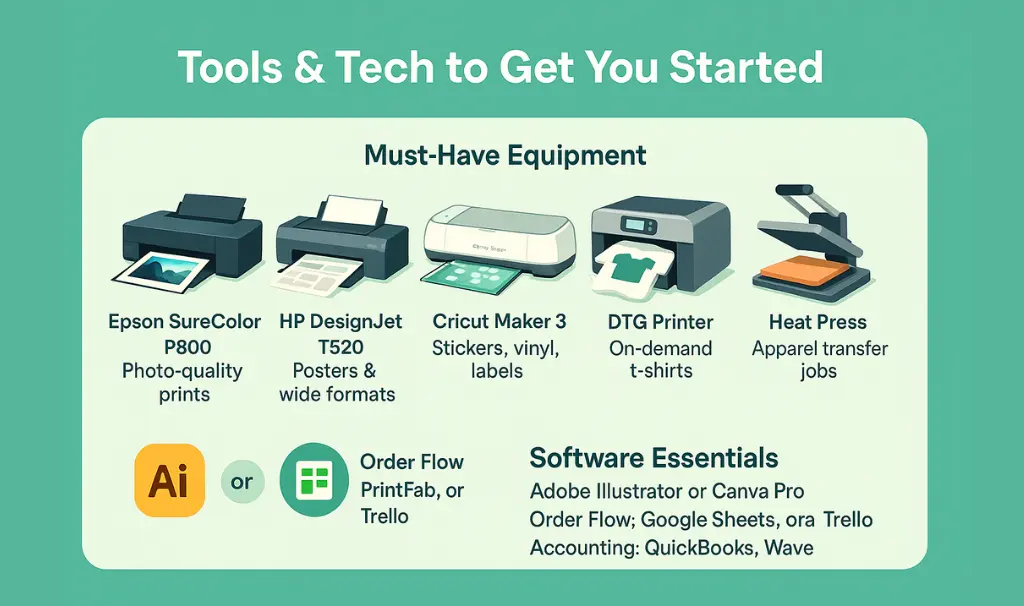
Must-Have Equipment (2026 Edition)
| Equipment | Best For | Price Range | Why It’s Popular |
|---|---|---|---|
| Epson F570 | DTF transfers (apparel) | $15,000 | Replaces DTG, lower cost per print |
| HP Latex 315 | Banners, signs, wraps | $9,000 | Eco-friendly, no ventilation needed |
| Canon imagePROGRAF PRO-300 | Photo prints, art reproductions | $800 | A3+ size, pro color accuracy |
| Cricut Maker 3 | Stickers, vinyl decals, labels | $400 | Beginner-friendly, huge community |
| xTool M1 | Laser cutting/engraving | $600 | Wood signs, acrylic products |
| Heat Press (Vevor 15×15) | Apparel transfers | $200 | Budget-friendly, durable |
2026 Software Essentials
AI Design Tools (New in 2026):
- Canva Magic Studio – AI-generated designs, auto-resize for products
- Adobe Firefly – Text-to-image for custom graphics
- Printful Design Maker – Built-in mockup generator
Order Management:
- Thrive (formerly OrderMyGear) – Client portals, bulk orders
- InkSoft – Web-to-print automation
- Google Sheets + Zapier – Budget DIY automation
Accounting (2026 Picks):
- QuickBooks Online – Industry standard
- Wave – Free for small startups
- FreshBooks – Invoice + time tracking
Don't Overbuy: Start with one core machine (e.g., DTF printer OR vinyl cutter), master it, then expand. Many failed print shops bought everything upfront and ran out of cash before getting customers.Creating the Right Work Setup
Where you work matters for productivity—and comfort.
Home Setup
- Spare room or garage
- Limited space = low cost
Commercial Unit
- Allows walk-in customers
- Room for expansion
Organize your space into zones:
- Design corner
- Print zone
- Storage & packing table
Keep safety and ventilation in mind.
Branding That Sticks
This is how people remember (and trust) you.
Start with:
- Memorable name
- Simple, bold logo
- Clear tagline (e.g., “Prints that Speak”)
Consistency counts. Match your color palette and fonts across your site, packaging, and posts.
Build a web presence:
- Portfolio site (try Wix or Shopify)
- Social media (Instagram, TikTok, Pinterest)
- Online storefront (Etsy, Gumroad)
Portfolio Must-Haves for 2026
Your website should showcase:
- Before/after mockups (e.g., blank shirt → final print)
- Client testimonials with photos
- Turnaround time guarantee (e.g., “48-hour rush available”)
- Custom quote calculator or contact form
- Blog with printing tips (boosts SEO)
Platforms to Sell On:
- Etsy – Stickers, art prints, invites
- Shopify – Full brand control, higher margins
- Faire – Wholesale to boutiques and gift shops
- Instagram Shop – Direct social selling
Getting Your First Customers
You don’t need a big budget, just hustle smart:
Offline Tactics:
- Distribute flyers in local markets
- Offer a discount to the first 10 customers
- Visit schools, cafés, and salons
Online Moves:
- Use Google My Business
- Run a small ad on Facebook or Instagram
- Offer referral bonuses
“Our first 30 orders came from WhatsApp and Instagram alone.” – Tariq A., Karachi-based mug printer
Running Your Shop Smoothly
Operations don’t have to be overwhelming.
Smart Workflow = Less Stress
- Use a whiteboard or software to track orders
- Prepare packaging kits in advance
- Label everything (inks, papers, tools)
Service Tips:
- Send mockups before printing
- Follow up with a thank-you note or email
Ready to grow? Bring on part-time help or add new product types.
Money Management & Green Practices
Keep tabs on costs:
- Rent, materials, and printer upkeep
- Software subscriptions
- Shipping supplies
Ideas for Extra Revenue:
- Subscription packages for small businesses
- White-label services for influencers
- Design-only services (no printing)
Go green: Offer recycled paper, use refillable cartridges, and promote batch printing.
Home vs. Commercial Space: What’s Legal?
Home-Based Checklist:
✅ Check HOA rules and city zoning codes
✅ Notify your home insurance (some policies exclude business use)
✅ Limit client foot traffic to avoid residential zoning violations
✅ Install proper ventilation for UV/solvent inks
Commercial Space Benefits:
✅ Walk-in customers allowed
✅ Can hire employees legally
✅ Separate business insurance (lower liability risk)
✅ Professional credibility with corporate clients
Hybrid Option: Start at home, move to shared warehouse space (like PrintingHub coworking) as you scale.
Automate to Save 10+ Hours Weekly
Use Zapier or Make.com to:
- Auto-create invoices when orders come in (Shopify → QuickBooks)
- Send design proofs via email automatically (Google Forms → Gmail)
- Update order status in real-time (Trello → SMS notification)
Batch Production Days:
Monday: Design approvals
Tuesday-Thursday: Print runs
Friday: Packing & shipping
Inventory Hacks:
- Pre-cut popular sizes (sticker sheets, business card blanks)
- Stock 5-10 bestsellers, print-on-demand for the rest
- Use clear bins labeled by product type
How to Price Your Prints Profitably
Formula:
(Material Cost + Labor + Overhead) × 2.5 = Retail Price
Example (100 Business Cards):
- Card stock: $5
- Ink & cutting: $3
- Your time (30 min @ $40/hr): $20
- Overhead (rent/utilities): $5
Total Cost: $33
Your Price: $33 × 2.5 = $82.50
Common Mistakes:
❌ Pricing too low to “compete” (you’ll burn out)
❌ Not charging for design time separately
❌ Forgetting to include equipment depreciation
Upsell Tricks:
Add rush fees (24-hour = +30%)
Offer 3 tiers: Basic, Premium, Deluxe
Bundle products (business cards + flyers = 10% off)
Wrap-Up
Setting up your own creative outlet is exciting, achievable, and genuinely profitable when done right. Focus on serving your customers well, invest only in what you need, and keep refining your services.
Remember: most top sellers started small, with one product and a dream.
FAQs
A: Custom packaging and DTF transfers have the highest margins (60-70%) with growing demand from small brands and resellers.
A: Yes, many successful printers learned on YouTube. Focus on one product type, practice for 2-3 weeks, then take paid orders.
A: Most home-based shops break even in 3-6 months. Commercial spaces take 6-12 months due to higher overhead.
A: Not mandatory. Use Canva templates or charge clients separately for custom design work ($50-$150 per design).
A: Anywhere from $2,000–$10,000 depending on your setup. You can also start with secondhand tools.
A: No, but YouTube, Skillshare, or a short design course can help.
A: Absolutely. Many successful printers started with nights and weekends.
A: Word-of-mouth, WhatsApp, and social media. Even a single well-printed order can lead to repeat work.

Alex Bennett is an entrepreneur whose practical tips have helped thousands improve their careers and grow with confidence.